Colorful Watercolor Flowers KDP Interior: A Practical Guide to Quality and Usability
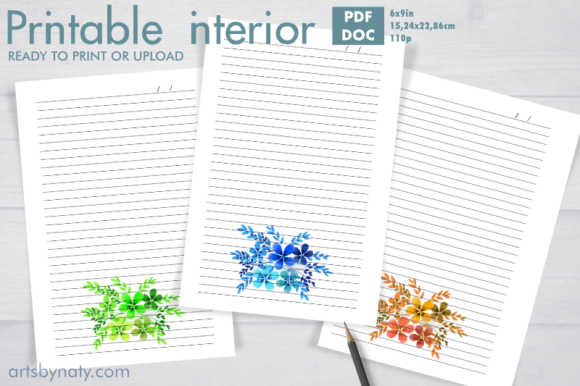
Creating a successful low-content book or a personalized gift often hinges on the quality of the interior design. For publishers and creators focusing on aesthetic journals, a Colorful Watercolor Flowers KDP Interior offers a vibrant alternative to standard black-and-white lined notebooks. This specific type of digital asset is designed to transform a simple writing pad into a piece of art, featuring gorgeous lined journal pages adorned with watercolor flowers in different colors on every page. However, selecting and utilizing these files requires more than just an appreciation for pretty graphics; it demands a technical understanding of print specifications and file management to ensure the final product meets professional standards.
Many entrepreneurs and hobbyists are drawn to this colorful watercolor flowers KDP interior because it serves as a wonderful printable interior to create beautiful gifts and products. The appeal lies in the emotional connection color evokes, making these journals ideal for gratitude logging, creative writing, or daily planning. Yet, the transition from a digital screen to a physical printed book is where many well-intentioned projects encounter friction. Understanding the nuances of resolution, color profiles, and file formats is essential to avoid costly reprints or dissatisfied customers.
Evaluating Resolution and Print Specifications
One of the most frequent oversights when acquiring digital interiors is assuming that all PDF files are created equal for print. When evaluating a Colorful Watercolor Flowers KDP Interior, you must verify that the file is truly high resolution at 300dpi. While an image may look crisp on a backlit monitor at 72dpi or 150dpi, printing at that lower resolution results in pixelation, blurriness, and a loss of the delicate watercolor texture that defines the design. Watercolor art relies on soft gradients and subtle edges; low-resolution rendering turns these artistic features into jagged, unappealing artifacts.
Furthermore, pay strict attention to the trim size specifications. This particular interior is formatted for 6x9 inches (15.24 x 22.86 cm). A common mistake occurs when creators attempt to resize a 6x9 interior to fit an 8.5x11 book or vice versa without adjusting the margins or bleed settings. Stretching a fixed-size PDF distorts the aspect ratio of the floral illustrations, making them appear squashed or elongated. Always match your KDP project settings exactly to the dimensions of the source file. If you require a different size, seek out a native file for that dimension rather than forcing a resize that compromises visual integrity.
Understanding File Formats and Editability
The inclusion of both a PDF and a DOC file in your purchase is a significant advantage, but it also introduces a potential point of confusion. Users often mistakenly treat the DOC file as the primary upload source for Amazon KDP. This is generally inadvisable. Word processors are not designed for precise print layout; they can shift elements, alter fonts, or change margin spacing during the conversion process. The DOC file included with this colorful watercolor flowers KDP interior is best utilized for personal customization, such as adding a dedication page or modifying text locally before converting back to a standardized PDF.
For direct uploading to KDP or professional printing services, always use the provided PDF file. This document has been pre-formatted with locked dimensions and embedded assets to ensure consistency across all 110 pages. Relying on the PDF eliminates the variable rendering issues associated with word processing software. If you do edit the DOC file, ensure you export it as a high-quality PDF and review it thoroughly in a previewer tool before uploading. Never assume the platform will auto-correct formatting errors; in print publishing, what you see in the final proof is exactly what the customer receives.
Color Management and Paper Selection
Watercolor aesthetics present unique challenges in print production that differ significantly from line art. A critical detail often overlooked is the interaction between ink density and paper type. Standard KDP white paper is 55# (90 GSM), which is suitable for text but can struggle with heavy color saturation. If the watercolor flowers in this interior feature deep, saturated pigments or large solid areas of color, there is a risk of ghosting (where images show through to the reverse side) or cockling (paper warping due to moisture).
To mitigate this, consider the intended use of the journal. If the colorful watercolor flowers KDP interior uses lighter washes and pastel tones, standard white paper is usually sufficient and cost-effective. However, if the designs are bold and opaque, you may need to adjust your pricing strategy to accommodate premium paper options or advise customers to use only one side of the page. Additionally, remember that digital screens display colors in RGB (light-based), while printers use CMYK (ink-based). Colors often appear duller in print than on screen. Always order a physical proof copy to evaluate true color fidelity before listing the product for sale. This step prevents the disappointment of receiving a book where vibrant teals have shifted to muddy greens.
Licensing, Watermarks, and Commercial Use
When sourcing digital assets for commercial products, clarity regarding usage rights is non-negotiable. A major benefit of this specific package is the explicit confirmation that there will be no watermarks of any kind on your product. Some creators accidentally purchase "preview" versions of interiors that contain watermarks, rendering them unsellable. Always verify the file description confirms a clean, commercial-ready version.
Equally important is distinguishing between digital files and physical goods. The product description clearly states: THESE ARE DIGITAL FILES ONLY NO physical product will be mailed to you. Misunderstanding this leads to customer service disputes and negative feedback. When listing your finished journal, ensure your product description clarifies that you are selling a physical book created using this interior, or if you are selling the digital template itself, make the delivery method unmistakably clear. Transparency builds trust and reduces return rates.
Checklist Before Publishing
To ensure your project succeeds, perform these verification steps before finalizing your colorful watercolor flowers KDP interior:
- Verify DPI: Confirm the PDF properties show 300dpi to guarantee sharp watercolor details.
- Check Margins: Ensure no floral elements fall within the safe zone gutter, especially on the 110-page count where inner margins are critical.
- Test Print: Print a single page on your home printer to check color balance and alignment before ordering a professional proof.
- Review Bleed: If the flowers extend to the edge of the page, confirm the file includes proper bleed allowance (usually 0.125 inches) to prevent white borders after trimming.
- Validate Page Count: Ensure your KDP setup matches the 110-page count exactly; adding or removing pages requires reformatting the entire document.
By approaching this colorful watercolor flowers KDP interior with technical diligence rather than just aesthetic appreciation, you elevate the quality of your output. Whether you are creating a heartfelt gift or building a product line for your business, respecting the specifications of the digital file ensures that the beauty of the watercolor art translates perfectly to the printed page. Grab yours now and enjoy the creative process, armed with the knowledge to produce a flawless result.