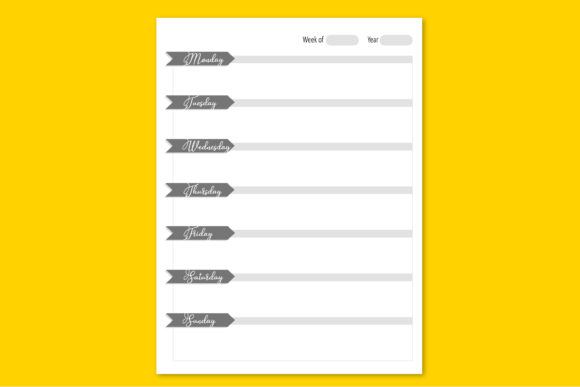
Evaluating the 120-Page Week Planner Template for KDP and Personal Productivity
Selecting the right organizational tool often requires balancing structural rigidity with creative flexibility. For independent publishers, content creators, and productivity enthusiasts, the distinction between a static PDF and an editable source file is significant. A Week Planner formatted at 8.5x11 inches with 120 pages represents a specific niche in the planning ecosystem. It is designed to bridge the gap between immediate digital utility and long-term print publishing. Understanding the technical specifications and practical applications of this format helps determine whether it aligns with your current workflow or business objectives.
Defining the Editable Week Planner Format
A standard week planner typically offers a fixed layout where users can only input data into predefined fields. However, an editable Week Planner provided as an Adobe Illustrator file shifts the user from consumer to designer. This format allows for granular control over every element, from grid lines and typography to margin safety zones and bleed settings. The 8.5x11 inch letter size is the industry standard for North American publishing, ensuring compatibility with most home printers and professional print-on-demand services.
The 120-page count is a deliberate specification. In the context of Amazon KDP (Kindle Direct Publishing), page count directly influences spine width, printing costs, and perceived value. One hundred twenty pages generally accommodate six months of weekly planning or a full year of condensed scheduling, depending on the interior layout density. For personal users, this length provides a substantial planning horizon without the bulk of a 300+ page annual journal. The single-file delivery method simplifies asset management, keeping all master pages, layers, and artboards contained within one document rather than fragmented across multiple files.
Technical Considerations for Illustrator-Based Planning
Working with a Week Planner in Adobe Illustrator differs fundamentally from using Microsoft Word, Canva, or InDesign. Illustrator is vector-based, meaning text and graphics remain crisp at any zoom level or print resolution. This is critical for producing high-quality KDP interiors where pixelation can lead to rejection or poor customer reviews. However, this precision comes with tradeoffs.
- Layer Management: Effective templates separate background grids, headers, and editable text areas onto distinct layers. This prevents accidental movement of structural elements while customizing dates or prompts.
- Master Artboards: Unlike word processors that flow text automatically, Illustrator relies on artboards. A 120-page planner requires efficient use of symbols or global swatches to ensure changes propagate correctly across all weeks without manual repetition.
- Font Licensing: When editing a Week Planner template, users must verify they possess valid licenses for any included typefaces. Commercial KDP publication requires fonts cleared for embedding and distribution, a detail often overlooked in template evaluation.
- Bleed and Margin Safety: Print-ready files require precise bleed setup (typically 0.125 inches). An editable template should have guides pre-configured to prevent content from being trimmed during the binding process.
Comparing Editable Templates Against Static Alternatives
When researching planning resources, it is necessary to weigh the benefits of an editable Illustrator file against other common formats. Each option serves different user needs and skill levels.
Editable Illustrator vs. Fillable PDF
Fillable PDFs are excellent for end-users who want to type directly into a planner on a tablet or computer without altering the design. They are low-friction and universally accessible. However, they lack structural malleability. If you need to change the column width, adjust the header font, or rebrand the cover for a new KDP product line, a fillable PDF is insufficient. The editable Week Planner serves creators and publishers who need to modify the underlying architecture, whereas the fillable PDF serves consumers who only need to input data.
Illustrator vs. Word and PowerPoint Templates
Word and PowerPoint templates offer familiarity and ease of use for those without graphic design training. They are adequate for simple, text-heavy planners. Yet, they struggle with complex layouts involving overlapping elements, custom textures, or precise typographic hierarchy. For a professional-grade Week Planner intended for commercial sale or high-quality personal printing, Word documents often result in formatting inconsistencies when converted to PDF. Illustrator maintains absolute positional accuracy, which is essential for meeting KDP’s strict interior file specifications.
Digital Apps vs. Physical/Hybrid Planning
Digital planning apps provide automation, syncing, and reminders that no static template can match. However, many adults aged 20–50 seek paper planning specifically to reduce screen time and enhance cognitive retention through handwriting. The 8.5x11 editable template supports this hybrid approach. Users can customize and print physical copies for tactile planning while retaining the digital master file for future iterations. This duality addresses the limitation of pure digital tools (lack of tangibility) and pure physical journals (lack of customization).
Strategic Fit for KDP Publishers
For those evaluating this Week Planner as a commercial asset, several decision factors determine viability. The "Ready KDP upload" designation implies compliance with platform standards, but verification remains the publisher's responsibility.
Assessing Market Saturation and Differentiation
The weekly planner category on KDP is highly competitive. Using a stock 120-page template without modification rarely yields sustainable results. The value of an editable Illustrator file lies in its capacity for differentiation. Successful publishers use such templates as foundations, adding unique value propositions such as niche-specific prompts, integrated habit trackers, financial logging sections, or proprietary branding. Before purchasing or downloading, evaluate whether the template’s base structure supports the modifications necessary to create a distinct product.
Production Efficiency and Scalability
Time-to-market matters in self-publishing. A well-structured 120-page Illustrator template can reduce production time from weeks to days. Look for features like paragraph styles, character styles, and linked assets that streamline batch editing. If updating dates for the next year requires manually adjusting 52 individual artboards, the efficiency gain is negated. Conversely, templates utilizing smart objects or scripted automation justify higher upfront costs by enabling rapid annual updates and format variations.
Practical Limitations and Decision Factors
No single planning format suits every scenario. Recognizing when not to use an editable Illustrator Week Planner is as important as understanding its benefits.
Skill Floor and Learning Curve
Adobe Illustrator has a steep learning curve. Users unfamiliar with vector graphics software may find basic tasks like resizing text boxes or adjusting colors frustratingly complex. If your primary goal is immediate planning rather than design iteration, a pre-formatted printable PDF or a dedicated planning app offers better utility with lower friction. Investing time in learning Illustrator is only justified if you plan to produce multiple planning products or require ongoing design control.
Hardware and Software Requirements
Editing a 120-page Illustrator file demands adequate system resources. Older computers or machines with limited RAM may experience lag when navigating between artboards or rendering complex vectors. Additionally, Adobe Illustrator requires a subscription, representing an ongoing cost. Compare this against one-time purchase alternatives or free open-source vector editors like Inkscape, keeping in mind that template compatibility may vary.
Content Volume Constraints
The 120-page specification works well for half-year planners or minimalist weekly layouts. However, if you require daily planning pages, extensive note sections, monthly calendars, and reference materials, 120 pages may be insufficient. Expanding beyond this page count in Illustrator can become unwieldy. For comprehensive annual planners exceeding 200 pages, Adobe InDesign typically offers superior text handling and master page functionality. Evaluate your content requirements honestly before committing to a fixed-length template.
Making an Informed Selection
Choosing the right Week Planner resource depends on aligning format capabilities with your specific objectives. If you are a KDP publisher seeking a compliant, customizable foundation for a niche weekly planner, an editable 8.5x11 Illustrator template with 120 pages offers professional-grade control and production efficiency. If you are an individual seeking immediate organizational structure without design responsibilities, alternative formats likely serve you better.
Consider your technical proficiency, available tools, content requirements, and end goals. Test sample files when possible to assess layer organization and editability before committing. Remember that the template is merely infrastructure; the value emerges from how you adapt it to meet genuine planning needs or market demands. Whether for personal productivity or commercial publication, the most effective Week Planner is one that reduces friction between intention and action while maintaining the flexibility to evolve alongside your changing requirements.