Dotted Journal KDP Interior: Custom 8.5x11 Template
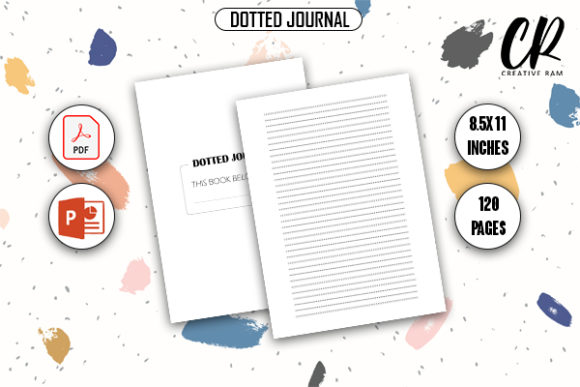
Creating a successful low-content book on Amazon KDP requires more than just uploading a generic grid; it demands a balance of technical precision and creative flexibility. The Dotted Journal KDP Interior provides exactly that foundation. Designed specifically for self-publishers, this template bridges the gap between a ready-to-upload product and a customizable asset. With dimensions set to the industry-standard 8.5″ x 11″ inches and a robust 120-page count, it serves as a versatile canvas for bullet journaling, sketching, note-taking, and specialized planning. Whether you are launching your first publishing venture or expanding an existing catalog, understanding how to leverage both the print-ready PDF and the editable PPTX source files is essential for building a sustainable portfolio.
Technical Specifications for Seamless Publishing
Before exploring creative applications, it is vital to understand why these specific specifications matter for KDP approval and customer satisfaction. The 8.5″ x 11″ format is the most popular size for productivity journals because it offers ample writing space without being cumbersome to carry in a standard bag. This dimension aligns perfectly with academic notebooks and professional planners, making it a safe choice for broad market appeal.
The inclusion of bleed settings is perhaps the most critical technical feature. Many new publishers face rejection or poor print quality because their dotted patterns run too close to the trim line or fail to extend fully to the edge. This interior comes pre-configured with proper bleed margins, ensuring that when the book is trimmed during manufacturing, the dot grid remains consistent and professional. The 120-page length hits a sweet spot for perceived value; it is substantial enough to justify a competitive price point but light enough to keep printing costs manageable, preserving your royalty margins.
Leveraging the PPTX Source File for Differentiation
While the high-quality print-ready PDF allows for immediate upload, the true value for long-term business growth lies in the PowerPoint (PPTX) source file. In a marketplace saturated with identical dot grids, customization is your primary differentiator. The PPTX file transforms this product from a static template into a dynamic design tool.
- Branding Integration: Add a subtle logo or brand watermark to the bottom corner of each page to build recognition across your catalog.
- Niche Adaptation: Modify the dot spacing or add header sections to create specialized versions, such as a "Lab Notebook" or "Recipe Journal."
- Front Matter Creation: Use the master slides to design custom title pages, index templates, or instructional guides that add unique value to your book.
- Cover Coordination: Extract design elements from the interior to ensure your book cover matches the internal aesthetic, creating a cohesive user experience.
By treating the PPTX file as a starting point rather than a final product, you can generate dozens of unique SKUs from a single base template, significantly reducing production time while increasing catalog diversity.
Creative Applications Across Niches
A dotted journal is inherently neutral, which makes it adaptable to virtually any audience. However, success on KDP often comes from targeting specific user needs rather than selling a generic notebook. Here is how different creators can adapt this interior for distinct markets.
For Educators and Students
The 8.5″ x 11″ size is ideal for academic use. By adding simple headers like "Date," "Subject," or "Key Concepts" via the PPTX file, you transform a blank journal into a structured study aid. Consider creating variations focused on specific disciplines. A math-focused version might include graph paper on alternating pages, while a language learning journal could incorporate vocabulary tracking boxes at the bottom of each spread. The dot grid itself supports both linear note-taking and visual diagramming, catering to diverse learning styles.
For Creative Professionals and Designers
Designers, architects, and artists prefer dotted grids over lined paper because they provide structure without imposing rigid boundaries. For this audience, emphasize the quality of the layout. You might create a "Sketch & Note" hybrid by leaving wider margins for annotations or adding measurement rulers along the edges. Since these users are visually sensitive, ensure your modifications maintain plenty of white space. Overcrowding the page defeats the purpose of a creative journal. The clean, minimalist nature of this template serves as a respectful backdrop for their work.
For Wellness and Mindfulness Practitioners
Bullet journaling has deep roots in mental health and mindfulness. This interior supports habit tracking, mood logging, and gratitude practices. To target this niche effectively, consider adding monthly reflection prompts or undated calendar spreads using the editable source files. The flexibility of the dot grid allows users to draw their own trackers, but providing a few pre-structured layouts can lower the barrier to entry for beginners. Focus on calming aesthetics and functional simplicity when customizing for wellness audiences.
Best Practices for Quality and Consistency
Maintaining high standards is non-negotiable in self-publishing. Even with a premium template, execution errors can lead to negative reviews. Follow these guidelines to ensure every book you publish meets professional expectations.
- Verify Margins Before Upload: Always download the latest KDP template generator to cross-reference your file. While this interior is designed with bleed, platform requirements occasionally shift. A quick verification prevents costly reprints.
- Test Print at Home: Print a few sample pages on your personal printer before ordering a proof copy. Check if the dot opacity feels right. Some home printers render dots darker than commercial presses; knowing this helps you adjust the PPTX file if necessary.
- Maintain Visual Hierarchy: When adding custom elements, ensure they do not compete with the user’s handwriting. Dots should be visible but unobtrusive. Headers and footers should use lighter weights or smaller sizes than the main content area.
- Document Your Variations: Keep a spreadsheet tracking which modifications were made to each version of the PPTX file. As your catalog grows, this organization prevents duplication and helps you replicate successful formulas.
Strategic Value for Publishers
For entrepreneurs and small business owners, efficiency drives profitability. This Dotted Journal KDP Interior eliminates the most time-consuming phase of low-content book creation: formatting. Instead of spending hours setting up margins, calculating bleed, and placing thousands of individual dots, you gain instant access to a professionally engineered foundation.
This time savings allows you to focus on higher-value activities like keyword research, cover design, and marketing. The ability to customize the PPTX file means you are not locked into a single product. You can respond to trends quickly, test new niches with minimal risk, and build a recognizable brand identity across multiple publications. Whether you are a freelancer looking for passive income streams or an established publisher optimizing your workflow, this template provides the reliability and flexibility needed to succeed in a competitive marketplace.
Ultimately, the best KDP interiors are those that disappear into the background, allowing the user’s creativity to take center stage. By combining technical accuracy with thoughtful customization, you create products that serve real needs and stand the test of time. Start with this solid foundation, apply your unique perspective, and build a catalog that resonates with your target audience.