Online Purchases Journal: A Practical Guide to Tracking Digital Spending Effectively
In an era where digital transactions happen with a single click or tap, maintaining awareness of personal and business finances requires more than just checking a bank statement at the end of the month. An Online Purchases Journal serves as a dedicated tool for recording, categorizing, and reflecting on digital spending habits. Whether you are a freelancer tracking business expenses, a content creator managing subscription costs, or a household budgeter trying to curb impulse buying, this journal provides the structure necessary to turn chaotic transaction data into actionable financial intelligence.
However, simply acquiring a journal does not guarantee better financial control. Many users download templates or purchase low-content books only to abandon them because the format does not align with their actual workflow. The effectiveness of an Online Purchases Journal lies not in its aesthetic appeal, but in its functional design and compatibility with your specific publishing or printing needs. Understanding the technical specifications and practical application of these tools is essential for avoiding frustration and ensuring the journal actually serves its intended purpose.
Common Misunderstandings About Template Specifications
One of the most frequent errors occurs during the selection or creation phase, specifically regarding file dimensions and software compatibility. When evaluating an Online Purchases Journal PDF Template, many buyers assume that any standard letter-size document will work seamlessly for Amazon KDP or personal printing. This assumption often leads to formatting disasters.
The industry standard for this type of journal is 8.5x11in Letter size. While this seems straightforward, the margin requirements for KDP upload differ significantly from standard home printing. A template designed for personal use may have margins that are too narrow for KDP’s binding requirements, resulting in text being cut off or the file being rejected during the upload process. Before purchasing or downloading a template labeled "Ready KDP upload," you must verify that the interior gutter margins account for the page count. A 120-page journal requires different margin settings than a 50-page booklet to ensure the writing space remains usable after binding.
Additionally, there is often confusion regarding editable files. Product descriptions frequently mention "Editable in Adobe Illustrator." A common mistake is assuming this means the file can be edited in free alternatives like Canva or basic PDF readers. Adobe Illustrator (.ai) files are vector-based professional design files. If you do not own or have access to Adobe Illustrator, an editable .ai template is functionally useless to you. Always confirm the file format matches the software you currently possess. If you lack Illustrator, seek out templates specifically formatted as editable PDFs or InDesign files, or opt for pre-formatted interiors that require no editing.
Overlooking Page Count and Content Density
Another practical oversight involves misjudging the relationship between page count and utility. A 120-page Online Purchases Journal is a popular specification because it strikes a balance between portability and longevity. However, users often fail to calculate how long this journal will actually last based on their entry frequency.
If your journal layout includes three lines per page for transaction details, 120 pages might only cover two months of heavy online shopping. Conversely, if the layout is sparse with ample reflection space, it could last a year. Beginners often select a journal based on total pages rather than entries per page. This leads to either running out of space prematurely or feeling discouraged by excessive blank space. Before committing to a specific template or printed book, map out your average monthly transaction volume against the journal’s layout density to ensure the 120-page count aligns with your tracking goals.
Evaluating "Ready KDP Upload" Claims Critically
For entrepreneurs and creators looking to publish their own branded journals, the phrase "Ready KDP upload" is a significant selling point. Unfortunately, this term is sometimes used loosely. Relying blindly on this label can result in costly proof copies and delayed launches.
A truly KDP-ready file must meet specific technical criteria beyond just size:
- Bleed Settings: If the journal contains decorative borders or background colors that extend to the edge of the page, the file must include proper bleed (usually 0.125 inches on the outer edges). Files without bleed will show unwanted white borders when printed.
- Color Profile: KDP interiors for journals are typically black and white. Submitting a file in RGB color mode can cause grayscale conversion issues, making lines appear faint or muddy. Ensure the template is set to CMYK or Grayscale before uploading.
- Font Embedding: Editable Illustrator files sometimes use fonts that are not embedded. If you open the file and lack the specific font, the layout may shift, ruining the alignment. Always check that all text is outlined or that the necessary fonts are included/licensed.
Taking five minutes to validate these elements saves hours of reformatting later. Treat "Ready KDP upload" as a starting verification point, not a guarantee of perfection.
Practical Application: Beyond Simple Recording
Mistakes in using an Online Purchases Journal often stem from treating it as a passive ledger rather than an active management tool. Simply listing the date, item, and cost provides historical data but little insight. To maximize the value of this tool, users should integrate categorization and intent analysis directly into their entry routine.
For example, instead of merely writing "$49.99 - Software Subscription," a more effective entry would include the category (Business/Tools) and a brief note on utility ("Used weekly for client invoicing"). This transforms the journal from a receipt log into a decision-making framework. When reviewing past entries, you can quickly identify which subscriptions provide genuine ROI and which are legacy costs that should be cancelled.
Freelancers and small business owners should also consider separating tax-deductible online purchases from personal ones within the journal itself. Using a simple checkbox system or color-coding method within the 8.5x11in layout can streamline end-of-year accounting. Failing to distinguish these categories during the initial recording phase creates a massive administrative burden later, negating the efficiency the journal was supposed to provide.
What to Check Before Making Your Decision
Whether you are buying a physical journal, downloading a digital template, or preparing a file for publication, a systematic pre-purchase checklist prevents buyer’s remorse. Avoid impulsive decisions based solely on cover art or marketing copy.
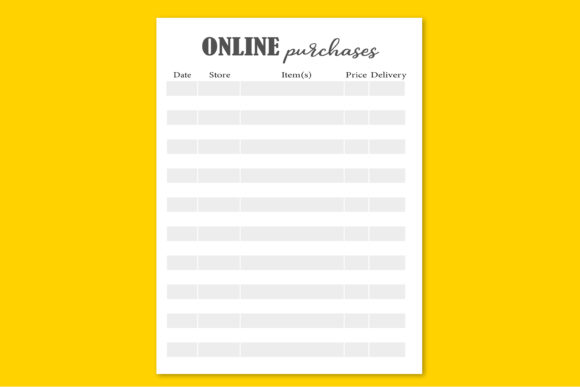
- Verify Interior Layout: Look at preview images of the actual inside pages, not just the cover. Ensure the line spacing accommodates your handwriting size and that the columns are wide enough for detailed descriptions.
- Confirm File Compatibility: If purchasing a digital template, double-check that "Editable in Adobe Illustrator" applies to your situation. If you cannot edit .ai files, look for alternative formats immediately.
- Assess Margin Safety: For KDP projects, measure the inner margin on the preview. For a 120-page book, the gutter should generally be at least 0.375 inches to prevent writing from disappearing into the spine.
- Evaluate Entry Capacity: Calculate your expected monthly entries and compare them to the journal's capacity. Ensure the 120-page length offers a reasonable lifespan for your specific needs.
- Check Licensing Terms: If you plan to resell or distribute the journal, verify that the template license allows for commercial use and KDP distribution. Personal-use licenses do not grant publishing rights.
An Online Purchases Journal is a powerful instrument for financial clarity, but its value is entirely dependent on correct selection and consistent application. By paying attention to technical specifications like the 8.5x11in size, verifying software compatibility for Adobe Illustrator files, and understanding the nuances of KDP preparation, you ensure that the tool works for you rather than against you. Approach the process with a focus on functionality and long-term usability, and your journal will become an indispensable asset in managing your digital economy.